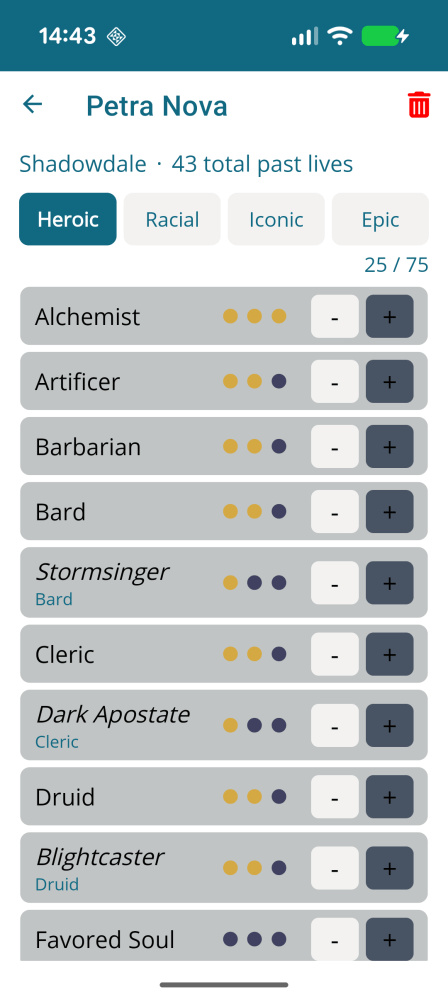
DDO Puzzle App v3.3

Hey all!

A new version of the app has been released to the Google Play Store and hopefully this will make some of you very happy – Reavers Fate and Shroud puzzle solvers are now available in the app πŸ˜€

I have been working on implementing my own versions of the code – but I eventually decided that the two solvers everyone knows and love do everything that people need. And why should I detract from the work done by those people? So the app embeds the web pages.

Continue reading

DDO Puzzle App v3.0

Yeah, I haven’t forgotten about the app. A new version has been released today.

Short version, this version has the navigation completely restructured to try and make it cleaner when adding new puzzles in the future (I do intend to!). I have also added the ability to ‘pin’ your favourite puzzles. Doing so will display them on the landing screen when the app opens. I have also had to temporarily remove the Crucible runewheel puzzle and detailed Prove your Worth lever puzzle as it was causing issues that I haven’t been able to resolve. They will be re-added when I can.

Continue reading

Using ngrok to debug your API’s from your Xamarin Forms App

Sometimes, you want to see what is going on when your nice shiny new App is supposed to connect to your awesome API and get some data from it/to it. Unfortunately – your App will (mostly) not connect to your API when it’s running on localhost. Android provides a nice little get around by using the DNS 10.0.2.2 – but this isn’t much use from an iOS device. And I find I really prefer to test from my development phones, rather than an emulator.

Recently I came across an amazing tool to help me out with this – ngrok. This creates an externally accessible URL poiting to your localhost. Even better – there is a Visual Studio extension that will start a tunnel for each application within your solution.

Continue reading

Recognising when an item updates within an Observable[Range]Collection

I’m currently working on an app that needs to show the pictures and videos held on the user’s device for them to select from. I came across this great post by @XamBoy that I have used to get the media and save it in an ObservableRangeCollection.

NB an ObservableRangeCollection is an object that inherits from ObservableCollection, created by James Montemagno and available through his MvvmHelpers NuGet. Everything described below can be changed to extend just the ObservableCollection instead.

Continue reading

Xamarin Forms Converters

I love Converters in Xamarin Forms. They give you a nice, easy way to display something through your XAML based on a value in your binding data. And they are so easy to set up.

All converters inherit from IValueConverter and must implement two methods: Convert and ConvertBack.

public class MyConverter : IValueConverter
{
public object Convert(object value, Type targetType, object parameter, CultureInfo culture)
{
// do something to get a new value
}
public object ConvertBack(object value, Type targetType, object parameter, CultureInfo culture)
{
// and change it back if you want to
}
}
view raw MyConverter.cs hosted with ❤ by GitHub
Continue reading

Mimicking a modal in Xamarin.Forms

Control Templates are a versatile element in Xamarin Forms. A good description can be found in the Microsoft documentation. Recently I wanted to try and save some screen space on an app where I have some help text that, especially on smaller phones, takes up more room than I would like. Using a Control Template to add functionality that replicates a modal window on a website was a nice way to ensure that the help text was still available, but only if the user wanted/needed to see it.

Here’s how we can do this.

Continue reading

Open cmder from Visual Studio

This blog has been inspired by Rick Strahl’s article Tip: Create a Visual Studio Menu option to Open a Command Window. Rick details how to set up Visual Studio to allow you to open Console2 from a keyboard shortcut within Visual Studio.

This is great, but I prefer cmder myself. The setup is very similar to the instructions provided by Rick, the only real difference being the argument to start in the current directory.

Continue reading

Kicking Off 2023

Hey everyone! Hope you all had a good Christmas/New Year/time off work – depending on how you look at the holiday season πŸ˜€

My New Year’s resolution (for what it’s worth) is to try and blog more, both here and over on my tech site. I did a terrible job with blogging last year – and what is the point of paying for these sites if I don’t use them? So, fingers crossed I can do better this year.

2022 was busy in terms of “real-life stuff” which meant that we only had a chance to play DDO a few days a week. Gone are the days when we played just about every day, and all weekend. However, some reasonable progress has been made. Hymm is trying to finish off the Iconic and Racial reincarnations he has left to get. Rach is doing the same with her main character, Willowing, although she is a few lives behind Hymm.

We have just finished off our latest Racial lives, Hymm was a Gnome Alchemist and Willowing a Dragonborn Sorceror. Do you know what happens when a Sorceror and Alchemist walk into a dungeon?

Everything dies πŸ˜€

Continue reading

Creating your own Splash Screens in DDO (redux)

Many, many years ago Geoff Hanna wrote a blog post about how to create your own splash screens in DDO. Unfortunately, Geoff’s blog is no longer active and I recently wanted to do this again, so I’ve decided to recreate the instructions (again) in case they are helpful to anyone.

So – splash screens. You know the ones I mean – the images shown while you are loading into an area. And although Standing Stones has some good ones – we all like the screenshots we take in-game πŸ˜€

Continue reading